Development Setup
This section will walk you through installing all the required tools to develop your first native Bedrock mod.
IDE Setup
We recommend you use CLion, a free (for non-commercial use) C++ IDE.
Creating a Visual Studio Toolchain
CLion's default toolchain, MinGW, is not ABI-compatible with Minecraft.
You'll need to install Visual Studio to provide the required build tools. Install the Desktop development with C++ package.
INFO
You can also use Visual Studio as an IDE, but the beginner guide will assume you are using CLion. We are just installing Visual Studio to provide the build tools to CLion.
In CLion, go to Settings > Build, Execution, Deployment > Toolchains. Click the plus icon, and select Visual Studio.
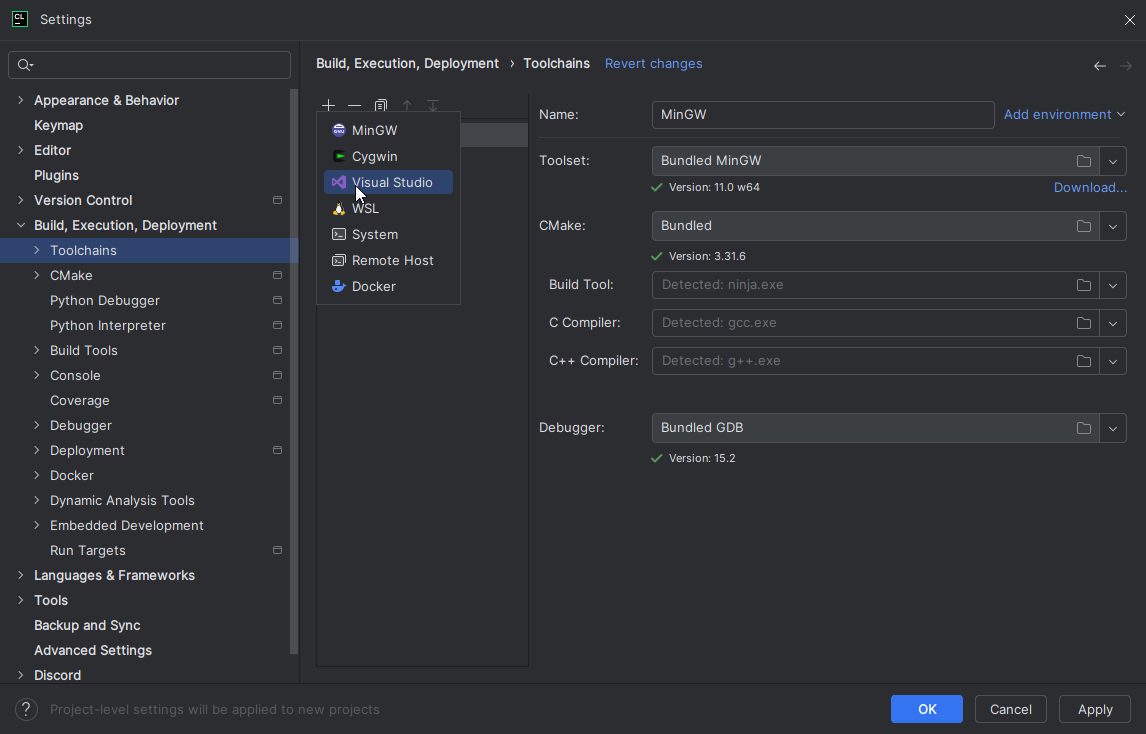
Click the up arrow near the plus icon to move the new toolchain up until it's at the top, and click Apply.
Now you have a Visual Studio toolchain, which can build code that is compatible with the game's ABI.
DLL Injector
As mentioned in the Introduction, to get your code running inside the game's process, you will build the code into a .dll file and inject it into the game. To do that, you'll need to install a DLL Injector.
For beginners, we recommend using Fate Injector.
INFO
DLL Injectors often falsely trigger anti-viruses (which is understandable, as DLL injection is sometimes used by malware).